
feed all

درباره سایت
آخرین مطالب
- The coffees are on me. No! you caot have a muffin...
- Can't write
- Updating to 16.04 doesn't seem to have gone as plaed.
- [ubuntu] Networking problemsProblem with apt-get
- [UbuntuGnome] Problems displaying boot screen and tty's, GUI is fine
- Grub not working now, after working for a week.
- Free and easy Andoid emulator
- [server] Not starting NFS kernel daemon: no support in current kernel.
- [lubuntu] Japanese input not working
- Migrating from OpenSuSE Server to Ubuntu Server, tons of questions
امکانات وب
Sorry if this is a bit long but it’s a complicated story.
I had a working quad boot system. (Win 7 Ult 64 bit, Win 7 Pro 32 bit, XP and Ubuntu 15.04)
(The two versions of Win 7 was for software testing)
The HDD was a MBR disc. Everything worked and I was happy!
Then there was a M/B fault that was beyond economic repair. Fortunately everything was fully backed up with Paragon B & R 11.
My copies of Win 7 were genuine MAPS versions so transferable to a new machine.
I bought a new Acer Travel Mate P253.
This had a 500GB GPT disc but booted in Legacy Mode. I reinstalled my backup of Win 7 Ult, used the original install disc to get it booting and sorted out new drivers etc and had a working machine again.
By this time I did not need Win 32bit and XP for backward compatibility so I did not install them.
I installed my backup of Ubuntu but it refused to boot from the re-installed backup.
Disc space was getting short so last week I bought a new 1TB WD Blue drive.
This tued out to be an MBR disc (strange I thought by 2016 this was no longer used)
Anyway I reinstalled my backup of Win 7 Ult and it refused to boot. The install disc could not sort the problem. (A backup from a GPT disc going onto a MBR disc)
I used DISKPART to convert it to a GPT Disc, reinstalled my backup, used the install disc to sort the boot and I had a working system. I like to keep my OS’s and Data on separate partitions.
I also created 3 Linux partitions Root (Ex4), Home (Ex4) and Swap.
See below there are 8 Primary Partitions so UEFI Legacy is not MBR
I am a bit puzzled as to why there are 2 GPT System Partitions.
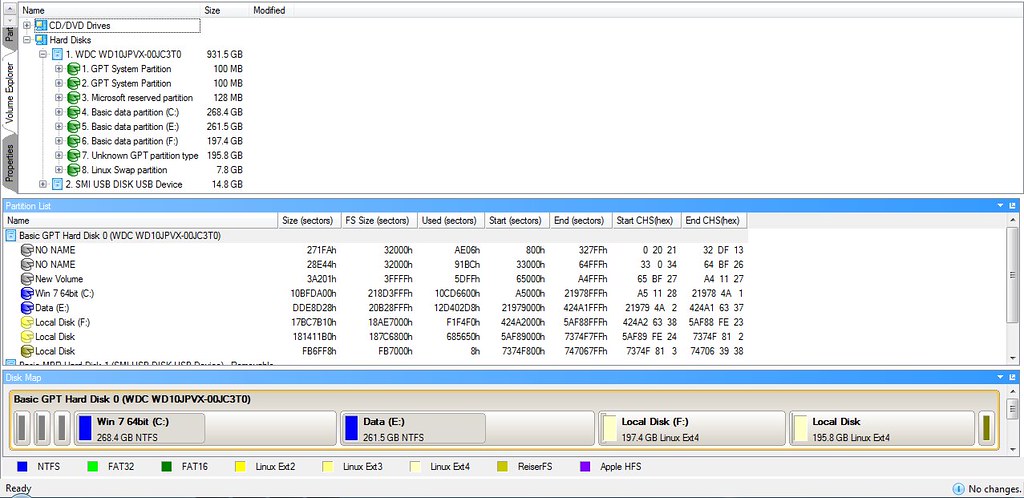
I then installed Ubuntu 16.04 64 bit (fresh install).
I was really worried about where to install Grub 2 so I put it dev/sda7 my root partition (Local Disc F above)
Rebooted no sign of my Grub loader it just booted to Win 7 as normal.
Tried EasyBCD 2.3 (The UEFI “aware” version I realise “aware” does not mean compatible)
I am in Legacy mode. I now gather UEFI Legacy is NOT the same as MBR booting.
However it says the following with a GPT disc and BIOS in legacy mode.
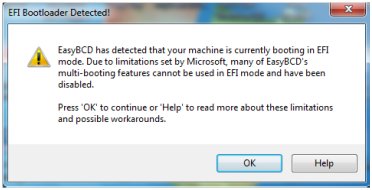
I now changed my BIOS Boot Mode to UEFI
Bingo! I get the Grub 2 Bootloader menu as I wanted and Ubuntu 16.04 boots perfectly BUT there is no option to Boot Win 7.
Not really what I wanted! I can now either Boot to Windows 7 or to Ubuntu but I have to change the BIOS settings each time.
I have had years of experience with MBR booting and understand it. I am also slowly starting to understand full UEFI but this UEFI Legacy mode has me beaten. I just don’t understand how it works.
When I install Ubuntu I choose “Something else” option.
OK on reading the Grub2/Installing Wiki it says on Page 2 “Device for bootloader installation”
I selected dev/sda7 my root partition.
Should I have chosen dev/sda? But then where does the bootloader go?
(I was worried about messing up the Win 7 boot so did not choose the ab ove option.)
What I want is a normal dual boot with a menu to select. I am not bothered if it’s a MS Windows menu or a Grub menu so long as I get the option to dual boot.
I don’t want to have to alter my BIOS settings each time I change OS.
برچسب:
نویسنده: استخدام کار